

To reduce e-waste at home, keep electronics in use longer, repair or upgrade them when practical, donate working devices, and send end-of-life electronics and batteries to accepted collection programs. Do not put lithium-ion batteries or devices containing them in household trash or curbside recycling unless your local program explicitly accepts them. Start by making a small list of unused phones, cables, computers and appliances, then choose a safe next step for each.
This guide gives ten practical ways to reduce electronic waste while protecting personal data and handling batteries carefully. For the broader waste hierarchy, see our Zero Waste Living beginner guide.
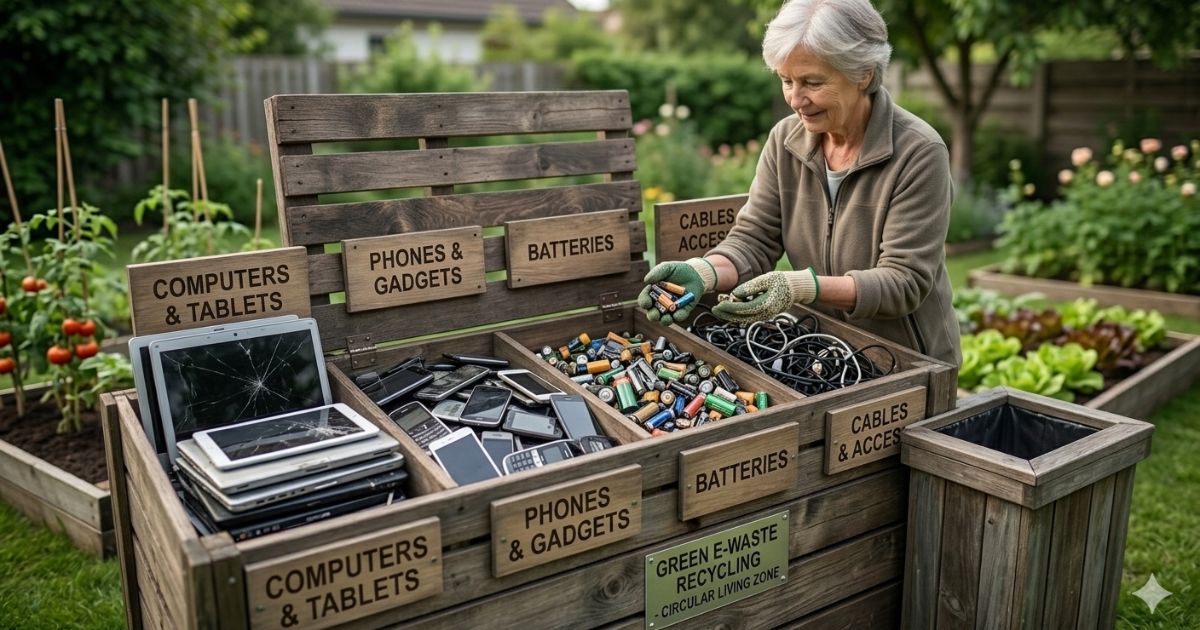
Ten ways to reduce e-waste
- Keep a device longer. Protect it with a case, keep it clean and follow maintenance instructions before replacing it.
- Repair before replacing. Ask a qualified repair shop whether a battery, screen, cable or component can be replaced safely.
- Upgrade only what you need. More memory or a storage upgrade may extend a computer’s useful life, if the model supports it.
- Buy fewer duplicate accessories. Check connector type and compatibility before purchasing new chargers, adapters or cables.
- Borrow or share occasional-use equipment. A rarely used tool or gadget may not need to be owned by every household member.
- Pass along working devices. Donate or sell electronics that still function and meet the recipient organization’s requirements.
- Use a take-back program. Check the manufacturer or retailer’s current recycling options and accepted items.
- Use a certified electronics recycler when available. EPA identifies R2 and e-Stewards as independent electronics-recycling standards.
- Recycle batteries separately when required. Follow local rules for rechargeable and lithium-ion batteries; tape terminals or bag batteries if the collection program instructs you to.
- Buy durable and repairable electronics. Before buying, check warranty, replaceable parts, software support, repair options and take-back information.

Prepare a device before donation or recycling
First decide whether the device is safe and usable. A working phone or laptop may be more useful to another person than its raw materials, but organizations may have condition, age or accessory requirements. Call or check the program’s website before traveling. If the device is damaged, swollen, hot, leaking or has a punctured battery, do not handle it as ordinary e-waste; follow the manufacturer’s and local hazardous-waste instructions.
Before donating or trading in a working phone, tablet or computer, back up files, sign out of accounts, remove SIM or memory cards, and perform the manufacturer’s factory-reset or secure-erase process. Remove the device from account-based activation locks when required. Do not assume that deleting a few visible files erases the whole device. If the electronics contain business, health or financial information, use your organization’s data-disposal rules.
Handle batteries with extra care
Lithium-ion batteries are found in phones, laptops, power tools, toys and other portable devices. EPA advises that lithium-ion batteries and devices containing them should not go in household garbage or recycling bins. A damaged battery may pose a fire risk. Check your local household hazardous-waste facility, retailer collection program or battery collection service, and follow its packaging and transport directions. If a battery is built into a device, ask the program whether it accepts the whole device.
Keep old electronics in a dry, secure place while arranging an approved drop-off. Do not stockpile damaged batteries indoors or mix loose batteries where terminals can touch. Collection rules vary by location, so use the instructions from the facility that will actually receive the item.

Reduce cost by extending product life
Waste-management savings often begin before disposal. A repair, battery replacement or compatible upgrade may cost less than buying a replacement device, but compare the repair quote with the device’s age, safety and software support. Avoid purchasing cheap accessories that fail quickly, and keep cables labeled so you do not buy duplicates. If a repair is not worthwhile, choose donation for working equipment or an accepted recycling stream for unusable items.
Electronics contain metals, plastics and glass that require energy and materials to produce. EPA explains that donation and recycling can conserve resources and help avoid pollution, while reuse can extend a device’s life. Recycling is not a reason to replace a working product early; repair, reuse and donation should be considered first when safe and practical.
Before buying a replacement, check whether the old device can be repaired, upgraded or used for a different task. A battery replacement, extra memory or a secure factory reset may extend useful life, but compare the repair cost with the device’s age, reliability and software-support window. If you pass electronics to another person, remove memory cards and SIM cards, sign out of accounts, erase personal data using the manufacturer’s process and confirm the device restarts to its setup screen. Keep proof of a donation or trade-in when available. For recycling, search your local government or an established manufacturer take-back program and confirm accepted items, fees and battery rules before travelling. Do not put loose lithium-ion batteries in household trash or curbside recycling; damaged or swollen batteries need special handling. A little preparation protects personal information, prevents collection problems and gives a working device a better chance of being reused.
Frequently asked questions
Can I put an old phone in curbside recycling?
Usually not unless your local program explicitly accepts electronics. Use a designated electronics collection, retailer or manufacturer program and follow its data-erasure instructions.
Should I remove the battery before recycling?
Follow the collection program’s instructions. Some devices have batteries that consumers should not remove; some programs accept the entire device. Do not force open a sealed product or handle a damaged battery.
What is the safest first step for unused electronics?
Separate working devices from broken or damaged items, then check local donation and recycling rules. Wipe personal data from working devices before giving them away.
Give electronics a responsible next step
Reducing e-waste means making a device last, passing a working item to someone who can use it, and recycling end-of-life electronics through an accepted channel. Protect your data, keep batteries out of the wrong bins and verify local collection rules. For a wider household plan, read our Zero Waste Living guide.
Further reading: U.S. EPA: Electronics Donation and Recycling · U.S. EPA: Used Household Batteries · U.S. EPA: Sustainable Electronics Management.